
Laytime Tracker
Burmester & Vogel's Laytime Tracker enables users and organizations to quickly view and track all of their laytime calculation files.
The Laytime Tracker is the product of several decades of expertise in service to and monitoring of the demurrage industry. The system provides Trade Execution and Demurrage teams an overview of active demurrage claims, profit and loss, and tools to monitor the status of each claim. The ability to quickly collaborate with colleagues and identify demurrage exposure accelerates the demurrage settlement process.
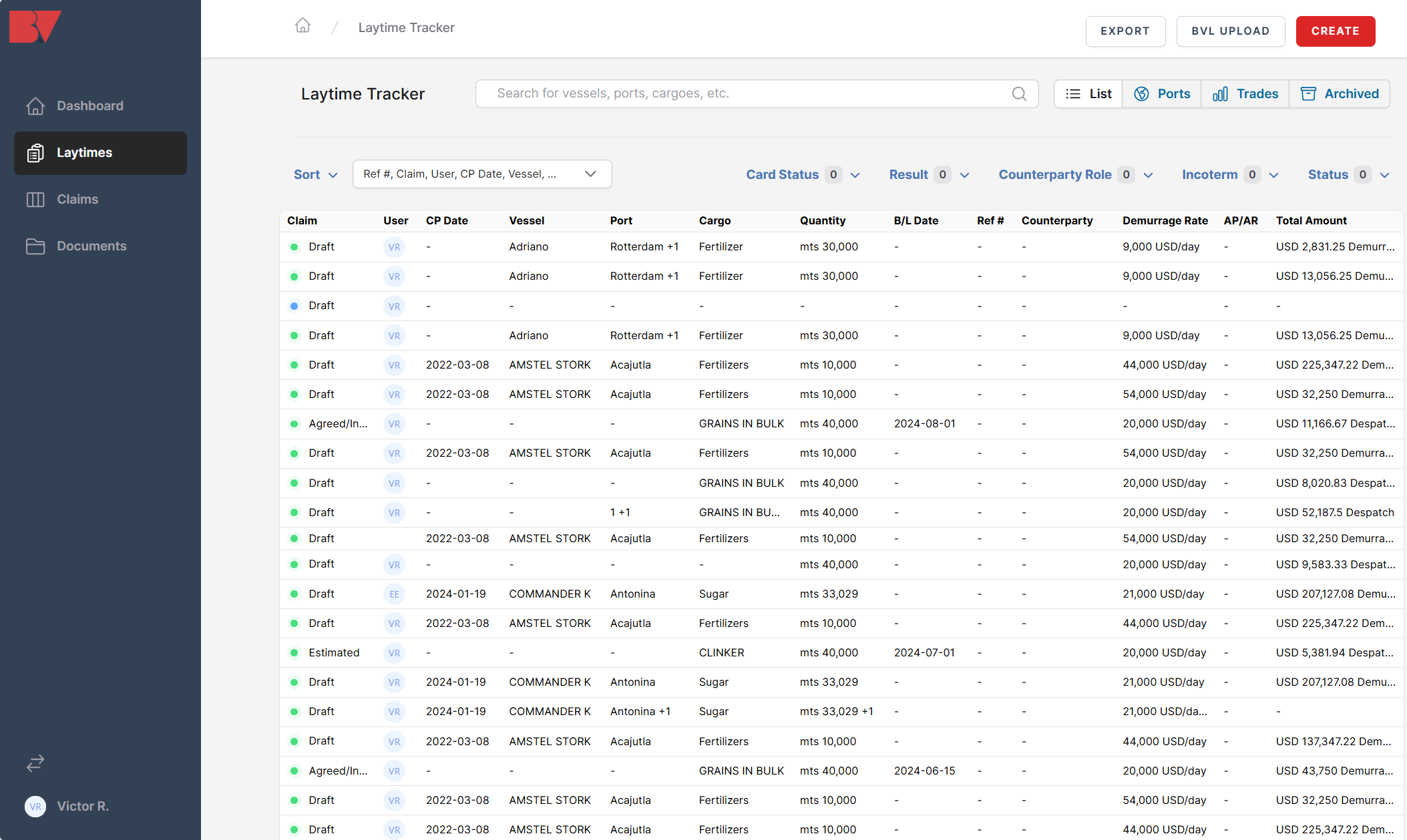
Whenever a laytime file (.BVL) is saved, it automatically appears at the top of the table which is ordered in reverse chronological order (most recent saves at the top) by default.
The fields available within the table are:
- Claim
- User
- C/P Date
- Vessel
- Port
- Cargo
- Quantity
- B/L Date
- Ref #
- Counterparty
- Demurrage Rate
- AP/AR
- Total Amount
Note: Some fields are required whenever saving a calculation (e.g., Quantity); others are automatically added or calculated by the system (e.g., User). Any fields that a user doesn't input and aren't automatically added or calculated by the system will appear as blank (-) values within the table.
A search bar is located at the top of the screen that enables users to quickly locate any .BVL files with corresponding data (e.g., "Fertilizers"; "Rotterdam"). Next to the search bar is the list view, where users can choose to view the files as a discrete list, per port (i.e., multi-port calculations list each port discretely), by trade, or any archived files.

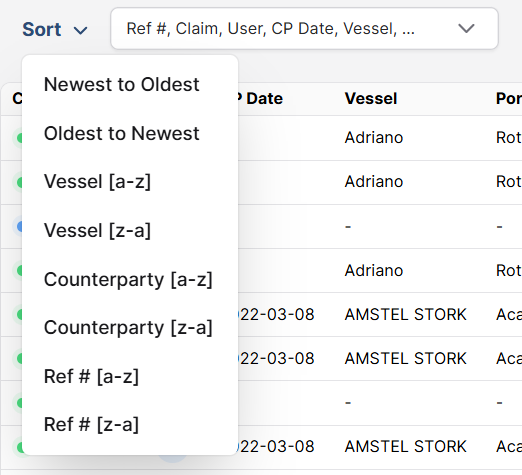
Directly above the column headers is the Sort feature that allows users to quickly sort their preferred list view.
The options available include:
- Newest to Oldest (default)
- Oldest to Newest
- Vessel [a-z]
- Vessel [z-a]
- Counterparty [a-z]
- Counterparty [z-a]
- Ref # [a-z]
- Ref # [z-a]
To the right of the Sort feature are the various filters users can apply to view select data.
The available options include:
- Card Status
- Draft
- Estimated
- Sent/Received
- Settled
- Agreed/Invoiced
- Result
- Demurrage
- Despatch
- Counterparty Role
- Shipowner
- Charterer
- Cargo Buyer
- Cargo Seller
- Terminal
- Incoterm
- CFR
- CIF
- DAP
- FOB
- Freight
- Status
- Draft
- Digitized
- Processing

To open a calculation file from the Laytime Tracker, simply hover the curser and click on the designated file.

Users can navigate between multiple pages within the table by simply click the forward or back buttons at the bottom of the table.
